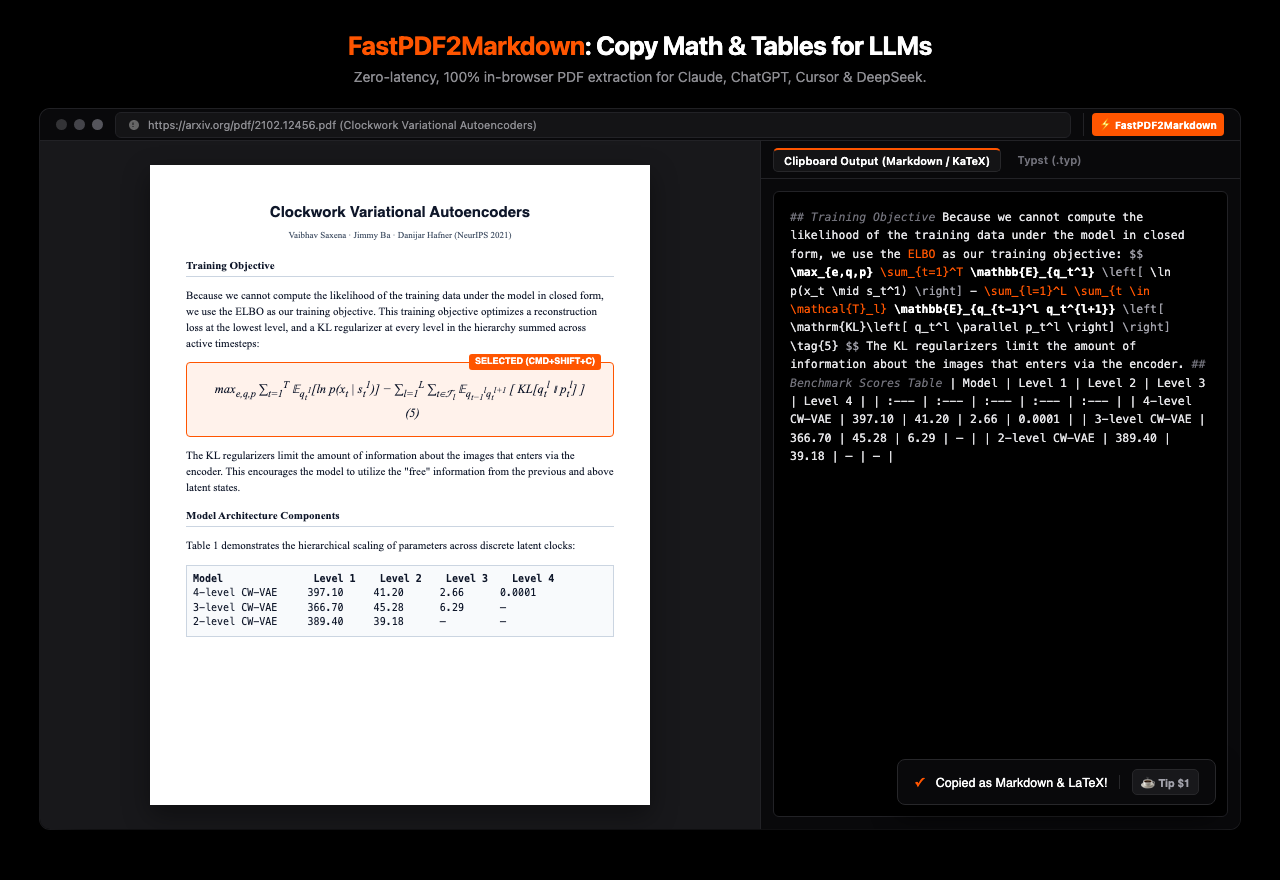
Instant, zero-latency browser extension that extracts paper equations, derivations, matrices, and benchmark tables into clean LaTeX and Typst Markdown ready for Claude, ChatGPT, Cursor & DeepSeek.
Clean mathematical context for LLMs without hallucinated formulas or broken formatting.
Uses a deterministic 2D Spatial Font-Stream Discriminator directly in JavaScript. Instant extraction with 0 MB neural network overhead.
Recovers row breaks (\\) and column separators (&) for Pauli matrices, rotation matrices, and Jacobian arrays into proper \begin{pmatrix}.
Extracts multi-column academic paper tables directly into clean GitHub Flavored Markdown tables ready for Obsidian, Notion, or LLMs.
One-click switcher in the popup to output either Markdown (KaTeX) or native Typst (.typ) syntax with = headings and mat(...) arrays.
Highlight any paragraph, equation, or table on any PDF tab in Chrome and press Cmd+Shift+C. Your clipboard is instantly populated.
Everything runs entirely in memory in your local browser tab. No text, images, or documents ever leave your computer.
Tested on a 53-page high-density monograph containing 3,780 formulas and 21,120 math tokens.
| Architecture / Method | 53-Page Latency | Per-Page Speed | Throughput | Memory Overhead |
|---|---|---|---|---|
| ⭐ FastPDF2Markdown | 0.556 seconds | 10.5 ms / page | 95.3 pages / sec | ~10 MB |
| PP-DocLayout-V3 ONNX (DETR Layout) | 32.9 seconds | 620 ms / page | 1.6 pages / sec | ~1.4 GB |
| GLM-OCR (0.9B Vision VLM) | 450.5 seconds | 8,500 ms / page | 0.12 pages / sec | ~2.8 GB |
| MinerU / Nougat Full Stack | 954.0 seconds | 18,000 ms / page | 0.06 pages / sec | > 16 GB |
Load the extension into Google Chrome without touching a terminal.
Download the packaged zip file containing the Manifest V3 code and icons.
Download fastpdf2markdown-extension.zipOpen Google Chrome and navigate to chrome://extensions. In the top-right corner, switch Developer mode to ON.
Unzip the downloaded file. Click the Load unpacked button in Chrome and select the unzipped fastpdf2markdown-extension folder.
Open any arXiv PDF paper or local file. Select any equation or table and press Cmd + Shift + C to copy as Markdown or Typst!